



























USB Hubs and Splitters for Sale
Do you want to expand the number of USB ports? Then, a USB Hub or a USB splitter are both cost-effective and easily-installed solutions.
After you plug one of these hubs into a USB port, you’ll instantly increase the number of available ports.
No complicated installation of drivers or other software is required.
In addition to being used for extension purposes, certain types of USB hubs can also be used for converting signals - e.g. if you have a USB-C device that you wish to connect to another device with a USB-A connector.
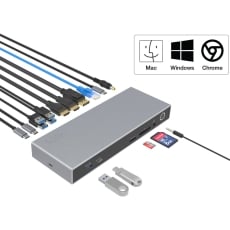
But if you also wish to have the ability to connect your laptop to one or several monitors, a docking station is far preferable.
Some of them can even double as an extra charger for your laptop.
USB Hubs and Splitters FAQs
What is a USB hub, and why do I need one?
A USB hub is like an extension cord for your USB port. If you run out of available ports for your laptop or desktop computer, you can connect a USB hub to one of the ports to increase the number of available ports in a matter of seconds.
In addition to increasing the number of USB ports, it’s also possible to synchronously use a hub to charge several devices with USB connectors (e.g. mobile phones) or even convert the signal from, e.g. an HDMI cable to a USB-A device.
How many USB hubs can you connect to a PC?
It is possible to connect and run several USB hubs simultaneously - some PCs can connect as many as 127.
However, be advised that each added USB hub or splitter will cause a reduction in the amount of power provided.
Although this reduction is hardly noticeable for small USB devices like flash drives, larger equipment and devices such as printers or external hard drives may stop working entirely.
Therefore, for such large consumption devices, you’ll need to use a USB adapter with external power.
Do USB hubs go bad? Can a USB hub damage my computer?
If a USB hub malfunctions, the root cause can be because of:
- A chafed or broken wire
- Static electricity
However, the USB hub itself will not damage your computer since the computer supplies the USB hub with power rather than the other way around.
With that in mind, if your USB hub goes bad, any data that you have stored on a USB drive that you’ve plugged into the USB hub runs the risk of being corrupted or even destroyed.
Therefore, if you suspect your USB hub is broken, don’t use it.
Can I use a USB hub for microphones?
If you have a microphone with a USB cable, you can use your USB hub for your microphone to connect to your computer.
And even if your microphone only has a 3.5mm connector, some USB hubs have special ports explicitly designed for this type of microphone.
If you have one of these hubs and your microphone supports a 3.5mm connector, you can plug it into this 3.5mm outlet.
Are USB splitters safe to use?
If you are using a powered USB hub, you don't need to worry - there is no risk of it damaging your device.
How much power does a USB hub need?
3 factors determine how much power a USB hub needs:
- How many ports the USB hub itself has
- Whether it’s USB 2.0 or USB 3.0 (USB 3.0 uses 0.9 Amps or current, while USB 2.0 only uses 0.5 Amps)
- The voltage of the USB port the hub is connected to (typically, this is 5 Volts)
For instance, a hub with 3 ports that uses USB 3.0 and is connected to a 5 Volt USB port needs 13.5 Watts of power.
Powered USB hub vs. unpowered - which is better?
The most significant advantage of a powered USB hub is that it can run more devices at full power with no performance reduction. This ability makes it suitable for appliances requiring a higher voltage, such as printers, monitors, and scanners.
Remember, though, that a powered USB hub requires plugging into an electrical outlet. They can also be more expensive compared to an unpowered USB hub.
By comparison, an unpowered hub will struggle to power several devices simultaneously, although it can still work fine if used to connect low voltage devices such as:
- Keyboards
- USB memory drives
- Small USB cables (e.g., ones for charging your mobile phone)
Why is my USB hub not working, and how can I fix it?
If for some reason, your USB hub malfunctions or does not work as intended, it can be because of one of these reasons:
- The cable for the USB hub is broken
- There's a fault with the USB port itself (caused by, e.g. debris in the port)
- The hub itself isn’t plugged into a wall socket (if it’s a powered USB hub)
Sometimes, it's possible to solve the problem effortlessly by unplugging and plugging it back into the USB port or even by plugging it into another available USB port.
Also, if it’s possible, try switching USB cables.
If you’ve attempted both approaches listed above and the hub still doesn’t work, try to clean the port using compressed air.
When doing this, please proceed with caution and don’t stick anything into the port itself, as this can cause irreparable damage.
Finally, if you’re using a powered USB hub, check that it’s connected to a wall socket since powered USB hubs won’t work without power.
How much do docking stations cost?
A docking station usually costs between $100 and $1000 depending on the brand, model, and whether the docking station itself is universal.
Are docking stations worth it?
A docking station not only gives you more USB ports - it also gives you the ability to turn your laptop into something resembling a professional work desktop.
This includes the ability to connect to:
- Network routers
- Up to 3 external HDMI monitors
- Older devices that use outdated ports like VGA or DVI that most modern laptops don’t support
A docking station also makes your laptop more ergonomic - a crucial aspect if you use it for daily work-related tasks.
Do docking stations charge your laptop?
Many docking stations have integrated AC/DC power adapters, which means you can use your docking station as a replacement for a conventional laptop charger.
The docking station's power is usually equivalent to the one your standard laptop charger provides. Sometimes, a docking station can even provide more power than a typical laptop charger.
Does a USB splitter affect performance?
Each port on your computer has a finite amount of bandwidth supplied by the motherboard.
When you connect a USB hub or splitter to one of your USB ports, the bandwidth provided to that port is then divided by the number of ports at the other end of the USB splitter or hub.
So to some extent, yes, a USB splitter does affect performance.
USB hub or docking station - which one is better?
A USB hub is the best choice if all you want is a small and affordable way to increase the number of USB ports for your computer.
However, if you want to connect your computer to a larger piece of hardware that requires a special connector (such as a monitor or a printer), USB hubs rarely have that option.
In that case, investing in a docking station is much more appropriate.
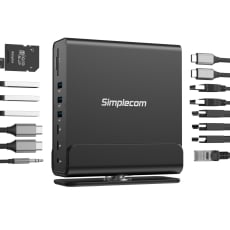
These can have as many as 10 USB ports, SD card readers, and even HDMI ports to connect your laptop to multiple external monitors simultaneously.
However, the disadvantages of docking stations are that they are less portable and much more expensive - especially compared to a USB hub, the latter of which can sometimes fit into your coat pocket with ease.
Are docking stations universal? What makes a docking station universal?
Some universal docking stations can be used for most laptops and notebooks, although the manufacturer designs many models only to be compatible with their own products.
In some instances, some docking stations will only be compatible with one specific laptop model made by a particular manufacturer.
An easy way to tell whether you’ve got a universal docking station is that they usually rely on a USB-C connection. If your docking station has a USB-C connection, it’s safe to assume it’s universal.
What are the differences between USB-C and a regular USB?
A USB-C connector can transfer data much faster than the standard USB connector and can also carry as much as 100 Watts of power.
This is why many mobile phones and laptops use USB-C ports since they can charge the phone’s or the laptop’s battery at a faster rate.
In addition, you can connect a USB cable or connector into its corresponding socket regardless of whether it’s upside down.
By comparison, you must plug USB connectors into their corresponding sockets with the correct side up.
Can I use a USB hub for charging my laptop?
Unpowered USB hubs rely on power provided by the laptop itself, which makes them unsuitable if you want to charge your laptop’s battery.
If you use a powered USB hub that needs to be plugged into a wall socket, on the other hand, it’s possible to charge your laptop.
What’s the difference between a USB splitter and a USB hub?
USB splitters and hubs have a few similarities - among other things, they both expand the number of available USB slots a computer has.
However, a USB hub gives you between 2-7 extra ports to connect additional devices, while a USB splitter is used to divide one line into two lines.
This dividing of lines makes it possible for you to connect a powerful piece of hardware, such as a printer and have it running on two computers simultaneously.