


Those setting up a home office or workspace in their business might be tossing up between buying either a standalone scanner or multifunction printer.
Both scanners and multifunction printers have their place, and knowing which one to bring into your space will help you work more efficiently. It can also potentially save you money as you may not need to purchase both devices separately, or at all.
To help you decide, let’s take a look at the key differences between standalone scanners and multifunction printers.
What is the difference between a scanner and a printer?
The main difference between a scanner and a printer is that scanners take physical documents and convert them into digital files, while multifunction printers do this along with having printing, copying, and sometimes also faxing capabilities.
What is a document scanner?
A document scanner is a device used to convert physical documents into digital format. This can be done by scanning the document and saving it as an image file, or by using Optical Character Recognition (OCR) to convert the document into a text file that can be edited.
When buying a scanner, it’s important to consider your personal needs and the features you require. There are two main types of document scanners: flatbed and sheet-fed.
Flatbed scanners


Pictured: Canon CanoScan LiDE 400
Flatbed scanners are typically a little more common and can scan documents of various sizes. The scanning area on these machines is typically around 8.5” x 11.7”, which is the standard size of an A4 piece of paper. Flatbed scanners tend to be a little slower than their sheet-fed counterparts.
Sheet-fed scanners

Pictured: Brother ADS-3100
Sheet-fed scanners, as their name would suggest, are fed documents one sheet at a time. These scanners can generally move through documents quickly, producing scans at good speeds. Oftentimes, sheet-fed scanners create scans that are a little lower resolution than flatbed machines, however, they do tend to be smaller and more compact.
What is a multifunction printer?
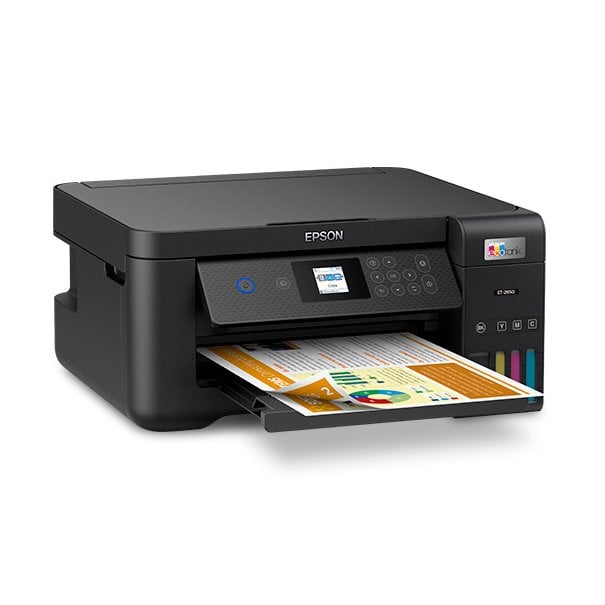
A multifunction printer (MFP) is a machine that not only prints documents but can also copy, scan, and sometimes fax them too. It’s handy for those that wish to have every function in one place, and can save valuable office space.
MFPs come in different shapes and sizes to fit different home and business needs. When choosing an MFP, it’s important to consider the size of your office or workspace and how much you’ll be using the machine. You’ll also want to think about the type of functions you’ll require. For example, some spaces may require faxing capabilities, while for others, this may not be a necessary function.
Document scanner or multifunction printer?
So, how do you choose whether you should purchase a multifunction printer or document scanner? Here are some factors to consider that might help you make your decision:
When should you purchase a document scanner?
If the only function you require in your home or office is scanning, then a simple document scanner could do the job. There’s no point spending money on a multifunction printing machine if the only ability you want it for is the scanning. Buying a simple document scanner will likely also cost less than purchasing a multifunction printer that can complete scans at a similar level of quality. As such, knowing what you need the machine for before making a purchase can save you money.
When should you purchase a multifunction printer?
A multifunction printer could be the ideal solution for those that need more than one function in their office or workspace. For example, if you need to print, copy, and scan documents on a regular basis, an MFP could be the perfect machine for your requirements. There are many different multifunction printers on the market, so you’ll have plenty of choices when it comes to choosing one that suits your home or office.
Working out whether a standalone scanner or multifunction printer is the best solution for you comes down to understanding your needs. If you only require scanning capabilities, then a document scanner could be the best option. However, if you need more than one function, then an MFP might be a better solution. Consider your needs carefully before making a purchase to ensure you get the right machine for your space.