

There are many wireless printers on the market in 2021, and countless reasons why a wireless printer might be a top preference for your next purchase. Wireless printers offer a very convenient and flexible solution to your printing needs.
Numerous companies manufacture wireless printers, including Epson, Brother, Canon, Samsung and HP. These wireless printers can be good for home or business use.
Wireless printers offer a convenient solution for printing from mobile devices if your home Wi-Fi network is compatible with wireless printing standards. For example, Apple AirPrint works with most newer Apple iOS products and allows you to print wirelessly from your iPhone, iPad or iPod touch without installing any additional software. If your printer is AirPrint-enabled and connected to the same Wi-Fi network as your iOS device, you can simply open the document, photo or web page you want to print and select the Print option.
Similarly, Google Cloud Print is a cloud-based printing service offered by Google that allows you to print from any device or computer with internet access, as long as you’re logged into your Google account.
If you’re looking to purchase a new wireless printer, then you’ll likely be interested in doing a little research to find the best wireless printer for your needs. This may include figuring out what type of specs you require, whether you’ll want wireless scanning and copying along with wireless printing, if colour pages are a must, whether you want Ethernet or USB connectivity, how many pages per minute you’ll need the printer to print, and any other features that are important to you.
In today’s article, we take a look at some of the elements you may like to consider when deciding which wireless printer to purchase. We also cover a few different wireless printer options on the market, running through their features and specs and how they’ve been rated so far.
What is the difference between a wireless printer and a Wi-Fi printer?
The terms wireless printer and Wi-Fi printer are generally used interchangeably to describe a wireless machine. However, while a Wi-Fi direct printer generally needs to connect to a Wi-Fi network to produce prints, a wireless printer may be able to print from a computer or mobile device without being on a Wi-Fi network.
All-in-one or simple printer?
When in the market for a wireless printer, you may hear the terms all-in-one printer and multifunction printer. An all-in-one wireless printer is a single device that can print, copy, scan and fax documents wirelessly. A simple printer is a machine that only prints.
All-in-one units will provide you with many different features, and save you from buying multiple machines, while a straightforward printer may be more affordable, and handy for if you only need to print and don’t require scanning, copying or faxing capabilities.
The decision of whether to buy an all-in-one wireless printer or a machine that just prints is a largely personal one. Think about your printing needs, whether you require scanning, copying, faxing – or if printing is all you need.
How many pages per minute?
The number of pages your printer can manage per minute is an important factor to consider when buying a wireless printer. Some printers are capable of managing many pages per minute, while others are a little slower. If you have many tight printing deadlines, or simply don’t like to wait around, then a printer that produces pages quickly could be a priority. Generally, printers produce black and white pages at faster speeds than colour pages.
Laser or inkjet?
Another decision to consider when shopping for a new wireless printer is whether you want a laser or inkjet model. Inkjet printers use ink cartridges to produce prints, while laser printers use toner cartridges.
Laser printers generally have faster printing speeds than inkjet printers and can produce higher-quality prints, but they can be more expensive to purchase. Inkjet printers are often less expensive than laser printers, but the ink cartridges can be more costly in the long run.
Weight and portability
The weight and portability of a wireless printer may also be worth considering. Some printers are bigger and heavier, meaning they’ll be more difficult to move around, while others are smaller and more lightweight. If you have a small space designated for your printer, such as a section of your desk, you’ll want to find a machine that can fit and isn’t too heavy. Alternatively, if you have a larger space available, you may instead be able to invest in a larger, bulkier wireless printer. However, don’t buy a larger printer just because you have the space. A smaller, lighter, and more portable printer may be perfectly suitable. You should consider a number of different elements when making your wireless printer selection.
What kind of connection?
When purchasing a new wireless printer, you’ll need to decide how you want to connect the machine. Almost all modern printers feature Wi-Fi connectivity for printing wirelessly, but some also offer an Ethernet port, USB ports and even SD card slots. Ethernet connectivity allows printers to be connected to a network via an Ethernet cable, while USB connectivity allows machines to be connected directly to a computer with a USB cable.
Monthly page duty cycle
Another element to consider when choosing a wireless printer is the monthly page duty cycle you’ll require. This refers to the number of pages that can be comfortably printed by a printer each month, and gives you an idea of how much printing you’ll be able to do. If you like to print frequently you’ll probably want to consider a higher monthly page duty cycle, whereas if you print less, a lower monthly page duty cycle may suffice.
Wireless printers on the market
Below are a few of the wireless printers currently on the market in Australia. From inkjet to laser, multi-function to simple printers, there are many different options to choose from!
Epson Expression Home XP-442
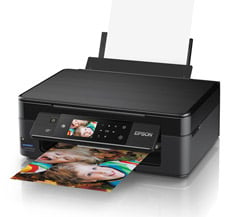

The Epson Expression Home XP-442 is a wireless all-in-one printer that can copy, scan, and print borderless photos up to 4 x 6″ in size. It has Wi-Fi Direct, and is compatible with Apple AirPrint, Google Cloud Print, and the Epson iPrint mobile app. The XP-442 has a 2.7″ colour LCD touchscreen and a built-in card slot for simple photo editing without a computer or mobile device. This wireless printer can print monochrome A4 pages at speeds up to 10ppm, colour A4 at speeds up to 4.5ppm, and 4 x 6″ photos in around 38 seconds.
Specifications
Warranty: 1 Year Return to Base Warranty
Printing Technology: On-demand Inkjet
Max Monochrome Printing Speed: Up to 10ppm
Max Colour Printing Speed: Up to 4.5ppm
Print Resolution (DPI x DPI): Up to 5760 x 1440
Max paper size: A4
https://www.epson.com.au/products/multifunctional/ExpressionHomeXP-442.asp
Brother HL-L2305W
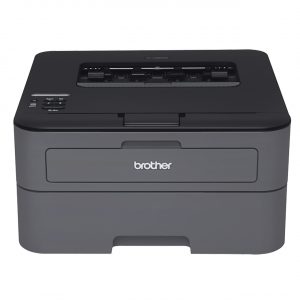

The HL-L2305W is a wireless monochrome laser printer. It can produce black and white pages at speeds up to 23ppm and has both wireless and Wi-Fi Direct capabilities. This laser printer has a recommended monthly print volume of between 250 and 2000 pages. It weighs 5.9kg, has a sleep mode to conserve energy, and a monthly duty cycle of 15,000 pages. The Brother HL-L2305W was given a 3.5-star rating by PC Mag.
Specifications
Warranty: 1 Year Return to Base Warranty
Printing Technology: Monochrome laser
Max Monochrome Printing Speed: Up to 23ppm
Max Colour Printing Speed: N/A
Print Resolution (DPI x DPI): 2400 x 600
Max paper size: A4
https://www.brother.com.au/en/products/all-printers/printers/hl-l2305w
HP DeskJet 3720 All-in-One Printer
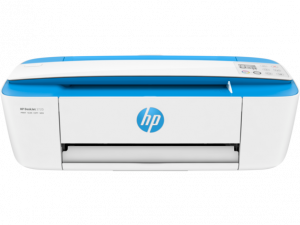

This wireless printer is called the “world’s smallest all-in-one printer” by HP. Along with printing, it can also scan and copy. The HP DeskJet 3720 prints black and white pages at speeds up to 8ppm and colour pages at speeds up to 5.5ppm. It prints pages at 4800 x 1200 dpi resolution, and has Wi-Fi Direct and Apple AirPrint capabilities. The 3720 is compact and weighs just 2.33kg, making it well-suited for desktops. It was given 6/10 by Tech Advisor.
Specifications
Warranty: 1 Year Limited Warranty
Printing Technology: HP Thermal Inkjet
Max Monochrome Printing Speed: Up to 8ppm
Max Colour Printing Speed: Up to 5.5ppm
Print Resolution (DPI x DPI): Up to 4800 x 1200 dpi
Max paper size: A4
https://www.hp.com/au-en/printers/product-details/8954258
Canon PIXMA Home TS3160
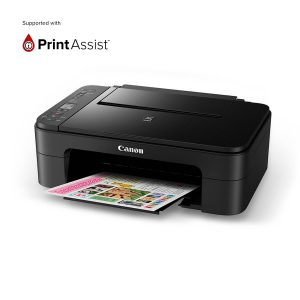
This affordable all-in-one wireless printer has a 1.5-inch LCD screen and a printing resolution of up to 400 x 1200 dpi. It can copy, scan, and produce borderless photographs up to 5″ x 7″. Its auto power on/off function allows for power saving, automatically switching on when a print command is received and switching off once the job has been completed. It can print black and white pages at speeds up to 7.7ppm and colour pages at speeds up to 4ppm.
Specifications
Warranty: 1 Year Print Assist Warranty
Printing Technology: FINE Cartridge
Max Monochrome Printing Speed: Up to 7.7ppm
Max Colour Printing Speed: Up to 4ppm
Print Resolution (DPI x DPI): Up to 4800 x 1200 dpi
Max paper size: A4
https://www.canon.com.au/printers/pixma-home-ts3160]
HP DeskJet 2722e All-in-One Printer
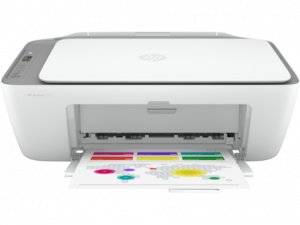
The HP DeskJet 2722e can print colour pages at speeds up to 5.5ppm and monochrome pages at speeds of up to 7.5ppm. As a wireless all-in-one printer, it can also scan and copy documents. The 2722e has a monthly duty cycle of up to 1000 pages, and a print resolution of up to 1200 x 1200 rendered dpi. This wireless printer has Bluetooth capabilities, meaning printing can be done from a tablet or smartphone.
Specifications
Warranty: 1 Year Limited Hardware Warranty
Printing Technology: HP Thermal Inkjet
Max Monochrome Printing Speed: Up to 7.5ppm
Max Colour Printing Speed: Up to 5.5ppm
Print Resolution (DPI x DPI): Up to 1200 x 1200 rendered dpi
Max paper size: A4
https://www.hp.com/au-en/shop/hp-deskjet-2722e-all-in-one-printer-297x0a.html
Epson Expression Premium XP-7100 Small-in-One
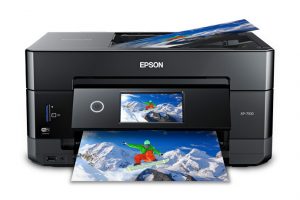

The XP-7100 can print both documents, photos, and DVD faces. This machine produces black and white pages at speeds of up to 15.8ppm, and colour pages at speeds of up to 11ppm. It can also print borderless photographs up to 8″ x 10″ in size. As an all-in-one, the Epson Expression Premium XP-7100 is also able to copy and scan. This printer has a 4.3″ touchscreen, and a maximum print resolution of 5760 x 1400 dpi. The XP-7100 weighs 9.75kg, and was rated 4/5 by PC Mag.
Specifications
Warranty: 1 Year Limited Warranty
Printing Technology: Drop-on demand MicroPiezo® inkjet technology
Max Monochrome Printing Speed: Up to 15.8ppm
Max Colour Printing Speed: Up to 11ppm
Print Resolution (DPI x DPI): Up to 5760 x 1400
Max paper size: A4
HP OfficeJet Pro 7720
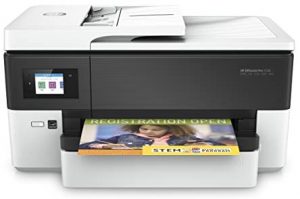

The 7720 prints monochrome pages at speeds up to 22ppm and colour pages at speeds up to 18ppm. It can also print both A3 and A4 pages, and also has scanning, copying, and faxing capabilities. This wireless printer has double-sided printing and an automatic document feeder for easier printing. It also has a 2.65″ LCD colour screen, and works with HP ePrint, Apple AirPrint, and Google Cloud Print. The 7720 weighs in at 15.5kg and has a monthly duty cycle of up to 30,000 pages. This printer was rated 3/5 by TechRadar, and 4/5 by TrustedReviews.
Specifications
Warranty: 1 Year Limited Warranty
Printing Technology: HP Thermal Inkjet
Max Monochrome Printing Speed: Up to 22ppm
Max Colour Printing Speed: Up to 18ppm
Print Resolution (DPI x DPI): Up to 4800 x 1200 optimise DPI
Max paper size: A4
https://store.hp.com/au-en/default/hp-officejet-pro-7720-wide-format-all-in-one-printer-y0s18a.html
Which is the best wireless printer for home use?
While there isn’t one best wireless printer for home use, there may be a few that best fit your needs and requirements. With so many choices on the market, finding the best wireless printer for your needs can be a fulfilling task.
When it comes to choosing a wireless printer for home use, you’ll generally be able to choose a machine with a lower monthly duty cycle than a machine you’d be purchasing for office use. With a home wireless printer, you may also need to prioritise size. If you don’t have a lot of space, a larger printer might be a bit much for your home. Instead, a compact wireless machine could be better-suited.
Which is the best wireless printer for business use?
If you’re looking for a wireless printer for business use, you’ll want to make sure that the monthly duty cycle is high enough to support your needs. Many printers aimed at businesses have a duty cycle of upwards of 3000 pages per month. This refers to the number of pages it can print each month, and a higher number generally makes it a more suitable machine for a small office or workgroup.
Additionally, many wireless business printers offer faster print speeds and higher resolutions than their home counterparts. This can be particularly important if your work requires you to produce many high-quality pages within a tight timeframe.
Choosing the right wireless printer for your needs
So, how do you choose which wireless printer to purchase? Well, there are a few things you may like to consider.
The first is the price. How much are you willing to spend? Some printers are more expensive than others, but there are also printers that are more affordable. Similarly, some printers may be cheap to purchase but the printing itself is more expensive, while others have a larger initial investment but have cheaper printing. This is often the difference between inkjet and laser printers. Inkjet printers are cheaper to buy, but you’ll likely pay more to print with them, whereas laser printers cost more to purchase but are typically cheaper when it comes to producing prints.
The next thing to think about is how often you will be using the printer. If you plan on using it frequently, then you might want to consider a printer with a higher print speed and monthly page duty. If you’ll be using your printer less frequently, then a lower monthly page duty may suffice.
You should also think about the size of the printer. If you have a confined space or a desk that you’d like the printer to sit on, you should keep this in mind when looking at machines. There’s no point having a big printer and nowhere to put it! Sometimes a more compact printer is the way to go.
Finally, you should decide which features are important to you. Do you need a printer with scanning and copying capabilities? One that can also print photographs or CD/DVD faces? You might want a printer with a touchscreen and the ability to edit photos on the machine itself, or maybe one that has the ability to do two-sided printing. These are all factors worth thinking about when making your choice.
Once you’ve worked out what exactly it is you want, you can then proceed with choosing the printer that best works for your needs.
We hope you’ve enjoyed learning about some of the wireless printers currently on the market. From compact, lightweight options through to larger machines, from those with multi-function capabilities to those that simply create prints, there are many options to choose from. Carefully consider what features matter most to you when making your selection and you’ll be sure to find a wireless printer that suits your needs!