Best shipping label printers
 When you run an ecommerce store, you may quickly get sick of hand-writing each shipping label yourself. If this is the case, you may be interested in investing in a shipping label printer.
Not online can a shipping label printer save you time, but it can also help you to avoid mistakes when labelling your items.
This is because you can print labels directly from your store’s database, meaning that the address, name, and other information will be accurate.
Of course, not all shipping label printers are created equal. Some are faster than others, while some have more features. To help you choose the best shipping label printer for your needs, we’ve put together this buyer’s guide.
Laser vs. thermal shipping label printer
First, let’s take a look at the different types of shipping label printers on the market. There are two main types of shipping label printer: thermal and laser.
Thermal shipping label printer
A thermal shipping label printer uses heat to transfer ink onto labels. Using specialised thermal paper, these printers produce high-quality labels that are both smudge and fade-resistant. There are both direct thermal printers and thermal transfer printers available.
One of the main advantages of thermal shipping label printers is that they are very fast. This is because these machines are specifically designed for printing labels.
Laser label printer
Laser printers can also produce product and package labels; however, they’re generally not built to do so. As such, laser printers tend to be a better option for those after a printer that can produce many different types of prints, rather than just labels.
Laser printers work by using a laser to transfer an image of the label onto the paper. This process is generally slower than that of a thermal shipping label printer.
Additionally, as laser printers are not built for printing labels, the quality of the labels is generally not as good as it would be if you used a thermal shipping label printer.
How does a thermal printer work for shipping labels?
A shipping label thermal printer uses heat to create durable, high-quality prints. There are two main types of thermal printer on the market: thermal transfer printers, and direct thermal printers. Each type works slightly differently.
Thermal transfer printers
These printers use a heated printhead to apply heat to a ribbon which then melts ink onto your labels, creating the prints. Thermal transfer printers create high-quality labels that are durable and smudge-resistant.
Direct thermal printers
As the name suggests, direct thermal printers create prints directly on the sticker paper without the use of a ribbon. These printers use a chemically-treated, heat-sensitive media that passes under a thermal printhead and blackens in the places where the words and images are to be printed, creating your labels.
Is a shipping label printer necessary?
While a shipping label printer isn’t a necessary part of running an ecommerce store, it can make the process of shipping products more streamlined and efficient.
Having printed labels will also make your business appear more professional to customers. Along with printing shipping labels, thermal shipping label printers can be used to produce barcodes, which can be helpful if you need to track inventory, and branded stickers for the front of your products.
In short, while a shipping label printer isn’t an essential piece of equipment for running an online store, it can be a helpful addition to your business.
What are the benefits of using a shipping label printer?
Purchasing a shipping printer label for small business can offer a number of benefits. There are lots of reasons why you may wish to buy a shipping label printer for your business, including:
Saving time
A shipping label printer can save you a significant amount of time when compared to writing out labels by hand. This is because you can print labels directly from your store’s database, rather than needing to fill them out by hand.
Avoiding mistakes
When you print labels from your store’s database, you can be sure that the information on the label will be accurate. This can help you to avoid any mistakes that could result in delays or returns.
Making your business easier to identify
Using a label maker to produce your product labels can make your brand more consistent and your business easier to identify. This is great for building a professional image.
Easier to contact
If you include your company’s logo and contact information on your labels, you will make it easier for customers to get in touch with you if they have any questions or wish to make a repeat purchase.
Improving efficiency
A shipping label printer helps to make your business more efficient by automating the process of labelling products. This can free up time that you can then use to focus on other areas of your business.
Making a good impression
Printed labels show customers that you run a professional and efficient business. This can help to build trust with your brand and encourage customers to order from you again in the future.
Reducing costs
Buying a shipping label printer could actually save you money in the long-run. It allows you to print labels in bulk, meaning you won’t need to have staff spending hours labelling up items to be shipped.
How to choose a shipping label printer?
With so many different types of shipping label printers on the market, it can be tricky to know which one to purchase. Below are several factors you might want to keep in mind when shopping for the best shipping label printer for your business:
Print speed
How fast does the printer need to be? If you’re only shipping a few items a day, you won’t need a machine that prints labels quickly. However, if you’re shipping hundreds of items, a faster printer could be worth the investment.
Label size
What size labels do you need to print? Most shipping label printers can accommodate a variety of label sizes, but it’s worth checking to make sure the machine you’re considering can handle the size of labels you need.
Connectivity
How do you want to connect the printer to your computer? Some models connect via USB, while others connect wirelessly. Consider how you want to set up your shipping station before deciding on a printer.
Thermal or laser?
As we mentioned earlier, there are two main types of ways to print shipping labels: thermal and laser. Thermal printers use heat to print labels, while laser printers use toner. Each option has its own set of pros and cons, so it’s worth doing some research to see which type of printer would be best for your needs.
Price
Of course, you’ll also want to consider your budget when choosing a shipping label printer. Printers can vary wildly in price, so it’s important to set a budget and find a machine that meets your needs without breaking the bank.
Shipping label printers on the market
Now that you know what to look for in a shipping label printer, it’s time to take a closer look at some of the models on the market. Here are four thermal shipping label printers that you might like to consider:
Brother QL-800
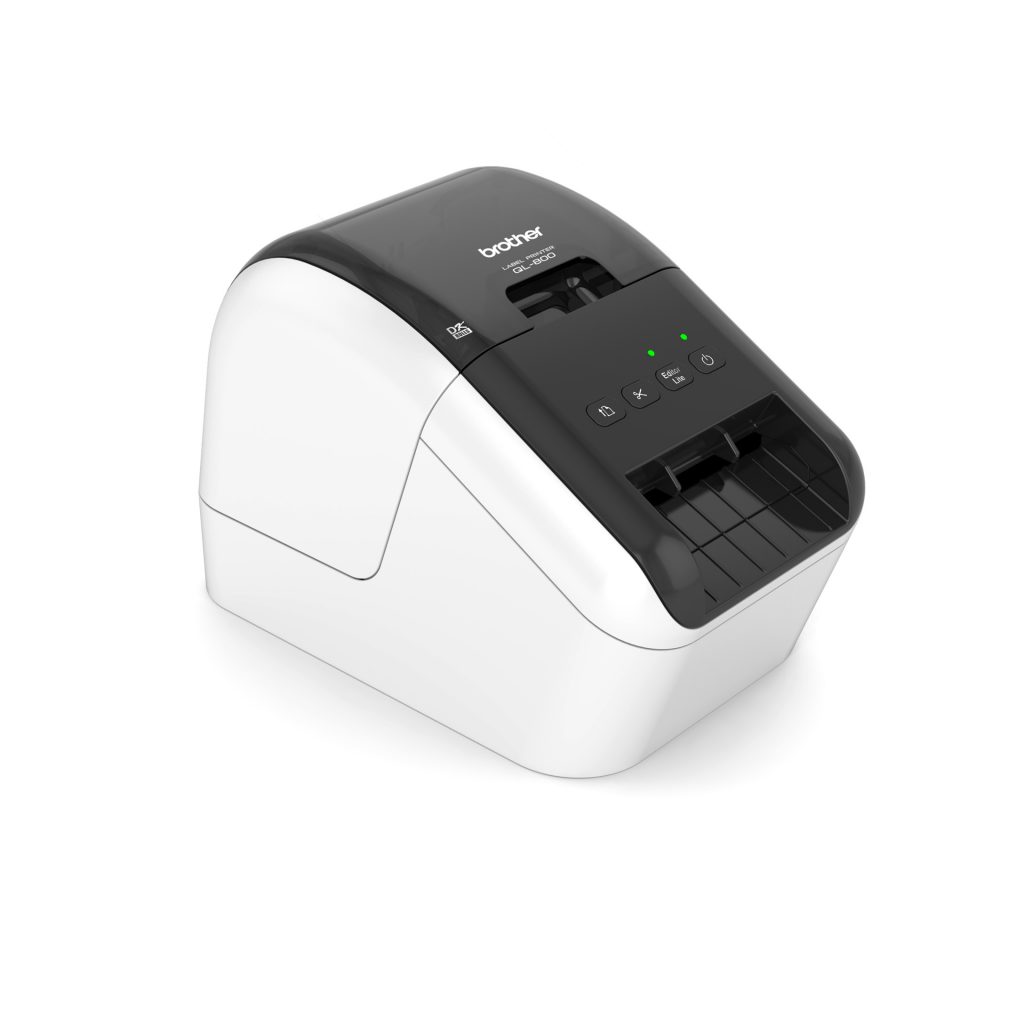
This affordable label printer is ideal for creating simple labels in either black or red text. It can print up to 93 labels per minute, creating prints up to a metre in length. The Brother QL-800 is compatible with both PC and Mac, connecting via USB. It’s great for use with both die-cut and continuous labels, with a built-in cutter for precision trimming. The free iPrint & Label app allows you to design your labels before printing them out. Print shipping labels up to 62mm wide with this machine.
DYMO LabelWriter 4XL

The DYMO LabelWriter 4XL is perfect for those that run lower-volume stores. A direct thermal printer, this machine creates prints at 300dpi, giving them fantastic clarity. It has a user-friendly design, and produces prints at speeds of up to 127mm per second. This label printer only works with rolls, so you won’t be able to print fanfold labels with it. Connecting to your computer via USB, it allows you to directly print through a number of platforms, including Shopify, eBay, Amazon, and Etsy. The DYMO LabelWriter 4XL can print labels up to 4″ x 6″ in size, making it perfect for those that require larger prints. The machine also comes with free DYMO Connect software that allows you to customise your business labels using more than 60 templates, as well as import data straight from datasheets.
Arkscan 2054A
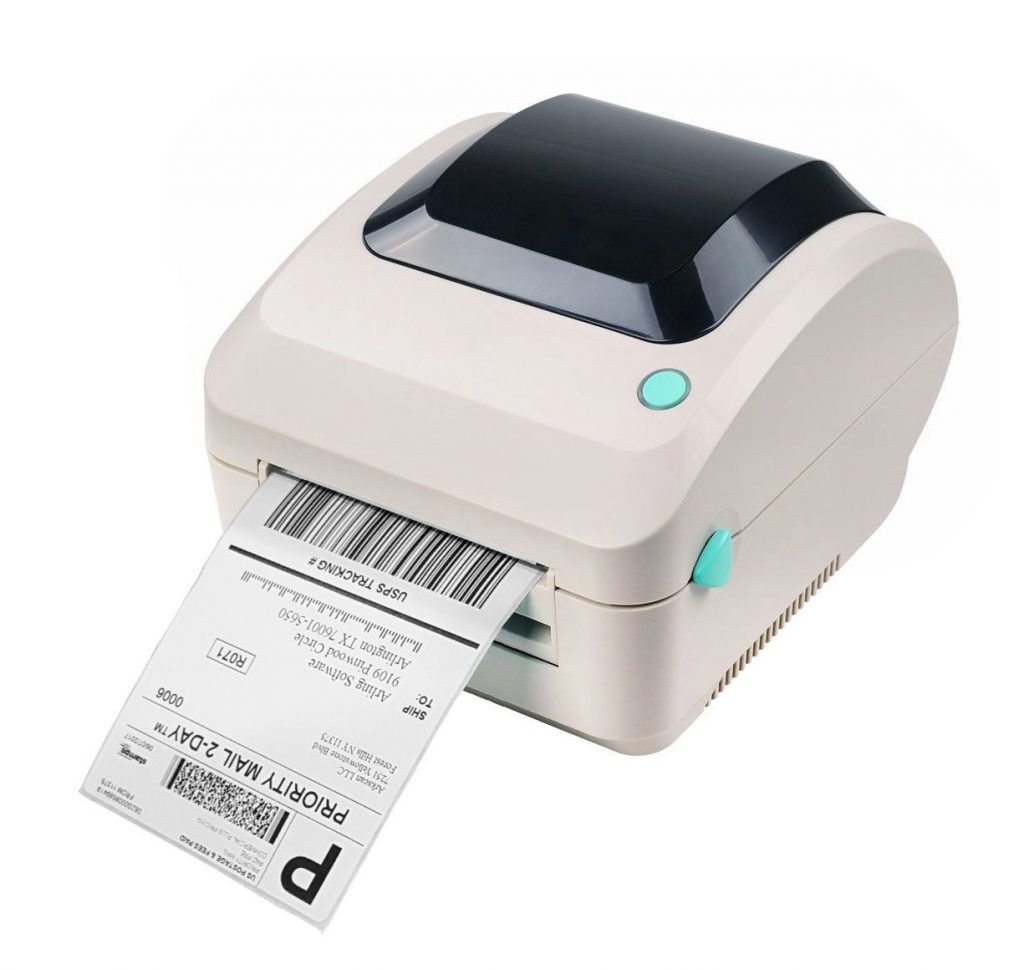
Using thermal direct technology, the Arkscan 2054A is a shipping label printer that can integrate with a number of platforms, including Amazon Seller Merchant Fulfillment, Shopify ShipStation, and Etsy. Along with printing shipping labels, it’s also designed to produce barcodes and product labels, giving your ecommerce store a full revamp. It can produce labels at speeds of up to 127mm per second, and can print both roll and fanfold labels. Sadly, this thermal printer is not compatible with Android or iOS.
Zebra ZD420

The Zebra ZD420 is a wireless thermal printer that works with both WiFi and Bluetooth. Compatible with both fanfold labels and rolls, it’s a versatile direct thermal machine that’s built for high workloads. It can produce labels as fast as 150mm per second, and is great for producing shipping labels, barcodes, and product labels. This direct thermal printer has NFC, allowing users to tap and print from their mobile device. It has a 3-button user interface, allowing you to easily navigate through your printing needs. This shipping label printer is compatible with a range of different platforms, including Shopify.
We hope you’ve enjoyed learning about some of the shipping label printers available on the market. With many different options to choose from, you’re sure to find a label printer that suits your needs.
When choosing the best shipping label printer for your business, there are a number of factors to consider. From label size and connectivity, to thermal or laser printing, and your personal budget, each business will have different needs.
Before making your purchase, consider the number of labels you’ll be printing, the type of connection you need, and the size of labelling you’re after. It’s important to do your research so you can find a printer that meets your specific requirements.
If you need a thermal shipping label printer, make Ink Station your first point of call. We offer a wide range of shipping label printers to suit any business, from small home-based businesses to large warehouses.
We have a variety of different models of shipping label printers available at competitive prices. Browse our selection today to find the perfect machine for your business. You can also stock up on sticker paper to keep your new label printer running smoothly.